


iCam365
2.61.87K Reviews
App Specs
- Version
- 3.63.5
- Updated On
- License
- Free
- Downloads
- 5,000,000+
- Developer
- Tange Inc.
- Categories
- Tools
- Platform
- Android
Screenshots


 Analysis by AppCompare
I judge a home-monitoring app by more than how quickly it opens a camera feed. I want to know whether I can check a useful view without fuss, whether an alert is actionable, and whether the setup makes sense for the cameras I already have or plan to use. iCam365 is a home security tool from Tange Inc., and its appeal is straightforward: it brings live viewing, motion alerts, and two-way audio together in a phone app. That can be a practical fit for simple household checks, though it is not automatically the best choice for every security setup.
Start with the camera and the job you need it to do
Before choosing a monitoring app, I would first think about what I actually need to see. Checking whether a pet is settled, keeping an eye on an entryway, and managing a more extensive security system are different jobs. iCam365 makes most sense when the priority is convenient access to a compatible camera and quick awareness of activity, rather than a complicated control center for every part of a home.
That distinction matters because an app cannot make a camera placement useful by itself. A view aimed at a busy street may produce movement that is not relevant to you, while a camera pointed at a doorway can make an alert easier to interpret. I’d decide what question I want the camera to answer, then choose its location and set motion sensitivity around that purpose. Useful alerts start with a useful view.
There are also practical questions worth settling before relying on any monitoring app: whether the camera is compatible, whether the home connection and phone connection are dependable, and whether I want recordings available later or only a live view. I would test the setup while at home before treating it as a way to keep watch from elsewhere. That small trial makes it easier to notice a poor camera angle, an alert that is too frequent, or a delay that matters for the way I plan to use it.
First Impressions: Setting Up and Getting Started
Getting started with iCam365 was a breeze. The app is available for both Android and iOS, and downloading it was as straightforward as you’d expect. Once installed, it guides you through a simple setup process. I was pleasantly surprised by how intuitive it is; no fumbling around or getting lost in complicated menus. Just follow the prompts, and you’re good to go!
The interface is clean and user-friendly, which is a big plus. I didn’t have to waste time figuring out where everything was. It’s all laid out neatly with clear icons and labels. If you’re not the most tech-savvy person, don’t worry—this app has got your back.
Features That Stand Out
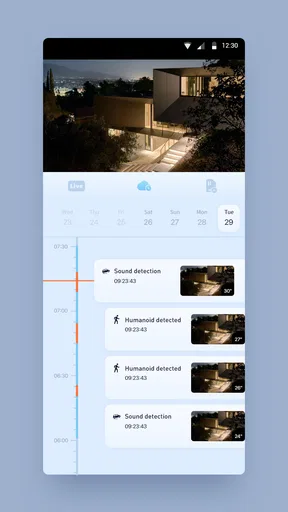
Now, onto the juicy stuff—the features. iCam365 offers a variety of tools to help you monitor your surroundings. First up is the live video feed. You can watch real-time footage from your cameras, and the quality is surprisingly good. Whether you’re checking on your pets or making sure your package gets delivered safely, the clarity is impressive.
Worth Reading Before You Choose

EA SPORTS FC Mobile 26 Is a Bigger Football Game, but It Takes Time

Flipboard Shows What News Apps Must Do Beyond the Feed

Switching to Android Auto Means Rethinking Your Driving Routine

Google Calendar Makes a Crowded Week Easier to Manage

Ludo King Makes the Most of the Minutes Between Plans

Baby Panda World Brings Quick Play to Modern Phones, but Its Game Library Feels Busy
Another feature I found useful is the motion detection alerts. The app sends notifications straight to your phone whenever it detects movement. You can even customize the sensitivity, so you’re not bombarded with alerts every time a leaf blows by. I found this particularly handy for keeping tabs on my front porch.
For a more informative test, I would adjust sensitivity in small steps rather than turning it down sharply after a busy day of notifications. The goal is to reduce unhelpful triggers without making the camera miss activity that matters. A camera watching a hallway may need a different setting from one facing a porch, so I’d review alerts from each view separately and make changes based on what the camera actually sees.
Plus, there’s a two-way audio feature. This means you can not only see but also communicate through the app. I tested this by talking to my dog while he was lounging in the living room—and yes, he was thoroughly confused but intrigued.
That kind of audio is handy for a brief check-in, but I would not treat it as a substitute for being physically present or as a dependable way to handle an urgent situation. Sound can be delayed, and a person or pet may not react as expected. For everyday use, a quick greeting or simple verbal cue is a more realistic expectation than a long conversation.
Performance and Reliability
Performance-wise, iCam365 holds up pretty well. The video feed is smooth with minimal lag, which is crucial when you’re relying on it for security. I did notice a slight delay in the audio transmission, but it wasn’t a deal-breaker.
That difference between watching and responding is worth keeping in mind. A short lag may not matter when I am checking whether a room is occupied, but it can make a live conversation feel less natural. If I were choosing an app mainly to speak to someone at the camera, I would give that interaction a real test before depending on it. For simple visual checks, the trade-off is easier to accept.
The app also offers cloud storage options for your video recordings. This is a lifesaver if you want to review footage later or if you accidentally delete something. The storage plans are reasonably priced, too, which is always a bonus.
Cloud recording changes the value of the app depending on what I expect to do with it. If I only want to peek at a live view, paying for storage may not be necessary for my routine. If I want to revisit an event, recordings are more useful—but I would check which plan suits my intended use before committing, since in-app purchases range from $0.99 to $199.99 per item. The free app is a low-friction way to start, while ongoing costs depend on the options I choose.
One thing I appreciated was the app’s reliability. Over the weeks I used it, I didn’t experience any crashes or glitches. It's rock-solid, and that consistency is something I value highly in any app, especially one that’s security-focused.
For a realistic daily routine, I’d use it as a quick check rather than stare at the feed continuously: confirm the camera is online before leaving, glance at the porch if a delivery is expected, and review an alert when it arrives. If the notification turns out to be harmless movement, I would adjust the camera angle or sensitivity instead of dismissing a stream of alerts forever. That approach makes the feature more useful and helps prevent notification fatigue.
How it compares with other ways to monitor a home
The usual alternatives fall into a few broad groups: a camera maker’s companion app, a general smart-home app, or a more extensive security service. A camera-focused app such as iCam365 is appealing when I want to get to a particular camera and its monitoring tools without navigating unrelated home controls. A broader smart-home app may be a better fit if my main goal is to manage devices from several brands in one place, while a security service may suit someone who wants a more structured, professionally supported arrangement.
I would not assume those alternatives offer the same features, costs, or compatibility; those details depend on the products involved. The useful comparison is about priorities. If my household already uses cameras intended to work with iCam365, its direct, simple approach is attractive. If I am still choosing hardware, I would check compatibility and the recording options first, then compare the complete setup rather than judging the phone app alone.
There is also a difference between monitoring and response. A phone notification can tell me that movement was detected, but it does not by itself decide whether that movement is a concern or take action at home. If I need someone to assess alerts or respond when I cannot, I would look at services designed around that need instead of expecting a camera app to fill the role.
Who is likely to appreciate it—and who may prefer something else
I can see iCam365 working well for someone who wants an approachable way to check a camera during the day, especially for ordinary tasks such as checking a pet’s room or seeing whether a visitor has arrived. The live feed, motion notifications, and two-way audio cover useful basics without making the app feel like a complex security console. It is also a sensible starting point for a less technical family member, provided the camera setup itself is manageable.
I would be more cautious if my needs depend on highly detailed footage, reliable two-way conversation, extensive device management, or a professional response process. The reported audio delay is a real limitation for conversation-focused use, and a notification-based workflow can become noisy if the camera sees too much irrelevant motion. Someone who wants one place to control a varied smart home may be better served by a broader platform, while a person with demanding security requirements should compare complete systems rather than rely on an app’s convenience alone.
Is It Worth Your Time?
In a word, yes. iCam365 offers a robust set of features wrapped in a user-friendly package. Whether you’re tech-savvy or a complete beginner, you’ll find it easy to navigate and use. The combination of live streaming, motion alerts, and two-way audio makes it a versatile tool for home security.
Of course, no app is perfect. The slight delay in audio might be a bit annoying for some, and if you’re looking for ultra-high-definition video quality, you might be left wanting more. But for the average user, iCam365 ticks all the right boxes.
The app is free to download, has an Everyone content rating, and is on version 3.58.4, with Android 7.0 as its minimum operating system requirement. It has an average rating of 3.7 from around 26,000 ratings, with more than 1 million installs. I treat those figures as context rather than a guarantee: the right choice still depends on the camera, the network, and whether the available recording options match what I want.
Switching away later is easiest if I first decide what matters most: live access, alerts, or saved footage. I would also avoid building a routine around recordings until I understand the plan I selected and have tested that the clips I care about can be reviewed. That is a modest bit of setup, but it prevents a common mismatch between expecting a simple live-view tool and wanting an archive of events.
So, if you're in the market for a reliable and easy-to-use home security app, give iCam365 a try. It might just be the peace of mind you’ve been looking for.
Pros
- User-friendly interface enhances accessibility.
- Real-time alerts for security monitoring.
- Easy integration with smart home devices.
- Cloud storage options for video backups.
- High-definition video quality for clear visuals.
Cons
- Limited free storage space available.
- Subscription required for full features.
- Occasional connectivity issues reported.
- No offline viewing option for recordings.
- Mobile app lacks some desktop features.
FAQs for iCam365
What is iCam365 and how does it enhance home security?
iCam365 is a versatile home security app designed for both Android and iOS platforms. It allows users to monitor their home in real-time through connected cameras. The app offers features such as motion detection alerts, two-way audio, and cloud storage for recorded footage, providing peace of mind and enhanced security.
Is iCam365 compatible with all security cameras?
iCam365 supports a wide range of IP cameras, but it's essential to check compatibility with your specific camera model. The app is continually updated to support more devices, but consulting the compatibility list on the app's official website or store page is recommended before purchasing or downloading.
Does iCam365 require a subscription for full functionality?
While iCam365 offers a free version with basic features, full access to advanced functionalities like extended cloud storage and additional security options may require a subscription. Users should review the available plans to determine which features they need and whether a subscription aligns with their security requirements.
How user-friendly is the iCam365 interface for beginners?
iCam365 is designed with a user-friendly interface that caters to both beginners and tech-savvy users. The setup process is straightforward, with step-by-step instructions, making it easy for anyone to configure their home security system. The app also provides comprehensive help sections and customer support for troubleshooting.
What measures does iCam365 take to ensure data privacy?
iCam365 prioritizes user privacy by implementing end-to-end encryption for video streams and data storage. The app ensures that only authorized users can access the footage. Regular updates are issued to patch security vulnerabilities, and users are advised to follow best practices, such as using strong passwords and enabling two-factor authentication.


